
Providing hospitals a solution to quickly identify potential danger before posing a huge risk on healthcare workers and patients.

Jump to solution
Duration
1 year 2 months
Jul 2025 - Present
STATUS
ROLE
Product designer
COMPANY
DT Research
Skills
User research
User interviews
Rapid prototyping
Usability testing
Cross-functional
collaboration
Tools
Figma
Claude
Notion
Microsoft Word
Background
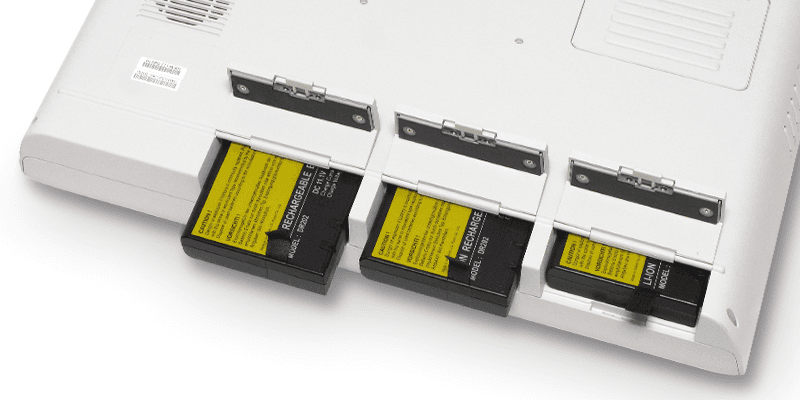
Hospitals manage hundreds of hot-swappable batteries, up to ~1800 in a span of 6 years, that must stay operational at all times.
Challenge
Currently, there is barely no support for battery monitoring in hospitals.

Goals
Solution Overview
Introducing DTR Battery Fleet Manager, a robust management solution that supports healthcare works with monitoring.
Dashboard
Providing bird's-eye fleet view for quick glance monitoring.
The dashboard displays rich data visualization of relevant attributes, including battery health and state of charge, and alerts.

Fleet List
Surfacing unhealthy batteries for actionable next steps.
The Fleet page is split between Battery and Device lists for better organization and granular visibility into each object.
Battery List

Device List

*Wamee is one of DT Research's close client
Settings Page
Configuring and adapting system to fit hospital's needs.
Settings page

Pain Points
Batteries are inspected once a year.
The monitoring tool used during the audit is outdated and only reads batteries installed in the device, not the entire fleet.
Batteries are only being discarded when they show visible signs of damage or poor performance.
Opportunity
Develop a modern monitoring tool of the whole battery fleet that can be used anytime anywhere, enabling greater visibility of battery health status and more frequent audits.
Mapping User Journeys
I consulted with healthcare stakeholders to align user needs and existing workflows from competitors to define new monitoring workflows.

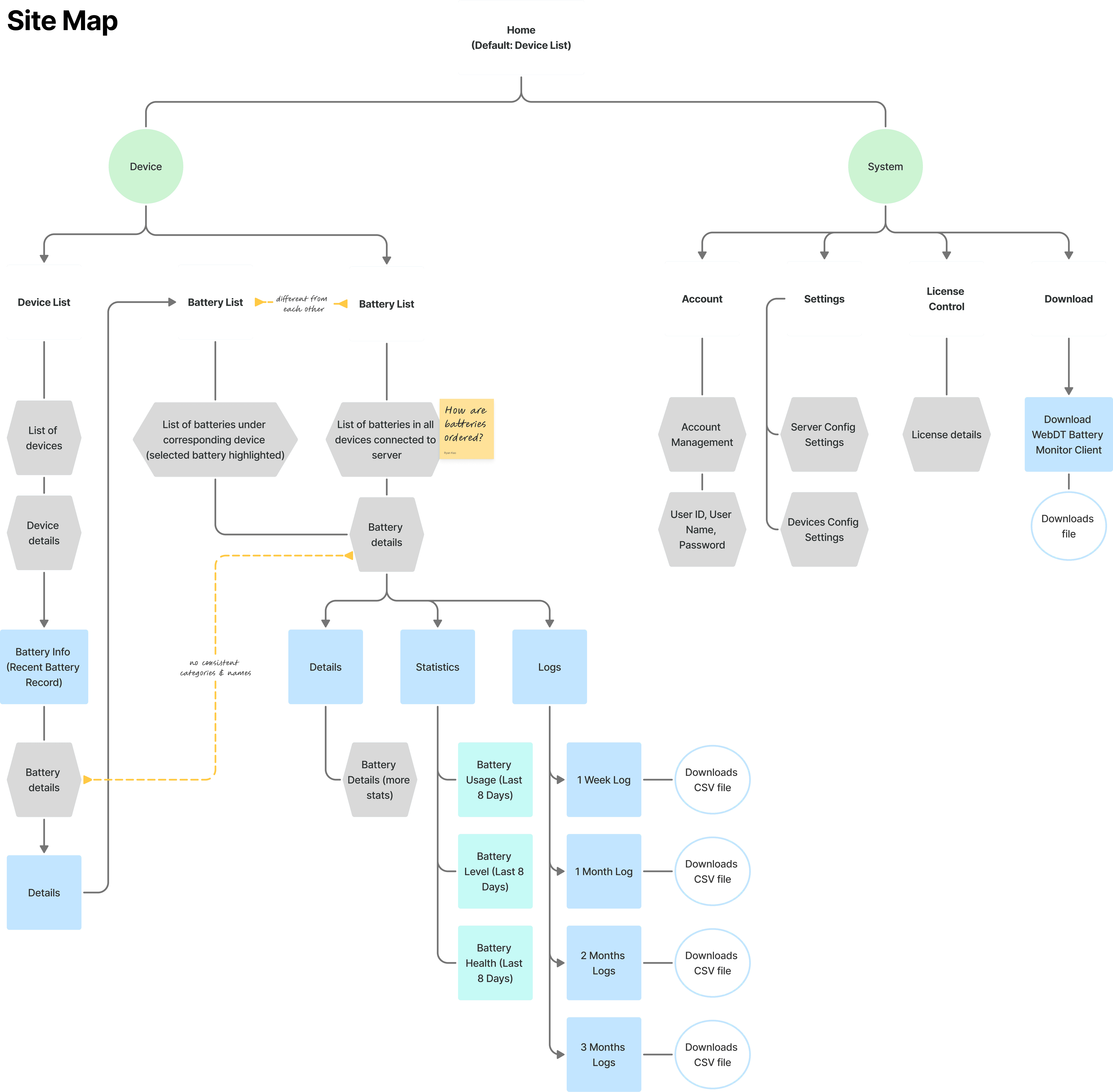
After mapping out the user journeys, I was able to begin planning the architecture of the software, with support from competitive analysis and prior feedback.
0->1 Design System
With no streamlined branding, I built an entirely new design system with WCAG compliance from scratch to set design standards for scaling and future development.

Iterations
Through feedback from healthcare stakeholders, internal engineers, and managers, I ensured literacy and usability for end users.

Spotlight
DTR Battery Fleet Manager gained some major spotlight prior to deployment.
It was presented and demoed at the HIMSS tradeshow in Las Vegas, NV during Q2 2026.

DT Research won the contract with our end client, Monash Health, and discussed iterations and presenting final designs with our reseller, HPA.
This product is slated for launch in Q4 2026, anticipating for immediate discarding of unhealthy batteries in existing fleets.
During our beta testings with our end clients, DTR Battery Fleet Manager yielded initial positive impact.
>300
batteries
identified as "unhealthy" that would otherwise be undetected
40%
greater satisfaction
with the promise the software would bring
Next Steps
DTR Battery Fleet Manager is expected to receive further updates through consistent user insight collection.
Some features that I'd like to explore for future iterations include:
SMS alerts for healthcare workers to receive
Increased compatibility with more DTR devices
Thanks for reading!